You have a presentation to build. You open PowerPoint. You stare at a blank slide. An hour later, you have a title and three bullet points. Gamma eliminates the staring. It generates complete, professionally designed presentations from a single sentence. It writes the copy, selects the images, and arranges the layout. You just provide the direction. Here is the exact workflow to go from idea to finished deck in minutes.
Start with the Create with AI mode. Open Gamma.app and look at the homepage. You see three options: Presentation, Document, and Webpage. Click Presentation. A text box appears asking for your topic. The quality of your output depends entirely on what you type here. Do not write "A deck about remote work." That generates generic content. Write a detailed description like "A professional pitch deck for a startup called GreenPulse that provides AI-powered energy-saving solutions for smart homes." Include the company name, the specific offering, and the context. Hit enter. Gamma generates a complete 8 to 10 page outline in seconds. Review the structure. You can edit titles, delete pages, or add new ones directly in the browser. The AI builds the skeleton. You approve the bones.
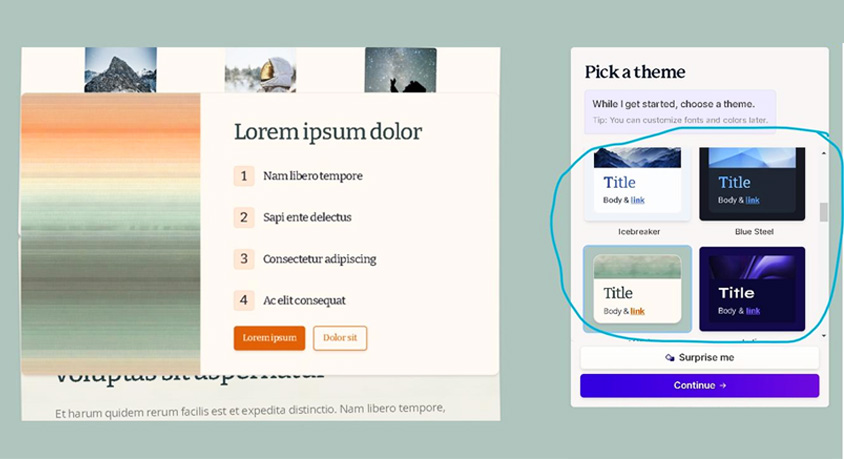
Now select your visual style. After confirming the outline, Gamma prompts you to choose a theme. Scroll through the options in the sidebar. These are not generic templates. Each one is professionally designed with typography, color balance, and spacing in mind. If you want a clean, Apple-like aesthetic, choose Prism or Orbit. For creative pitches, try Neon. Click your choice and then click Generate. Watch as Gamma renders each page one by one. It writes the copy based on your outline, sources relevant images, and lays out every element. The entire deck appears in under ten seconds.
Use the editing companion for refinements. Click on any element you want to change. A sidebar opens with an "Edit with AI" chat box. Type natural language commands. Say "Turn this list into a 3-column layout with icons." The AI reformats the page instantly, pulling in vector icons that match your content. Say "Make this paragraph more concise." It rewrites the text. Say "Change the image to something more modern." It searches for and places a new image. You are not manually adjusting boxes and fonts. You are directing an AI designer.
Add interactive elements to stand out. Gamma is not limited to static slides. Click the embed button and paste a YouTube URL. The video plays directly in your presentation. Add a Google Map to show locations. Embed a live webpage to demonstrate a tool. These elements make your deck feel like an app, not a slideshow. For images, you can drag and drop your own or use the built-in generators. Click any image placeholder and select "Generate with AI." Type a description like "modern smart home with solar panels at sunset," and Gamma creates a unique image on the spot.
Share or export when finished. Click the Present button for a clean, animated playback. But the real power is the share link. Generate a URL and send it to your boss or client. Gamma provides analytics showing how long they spent on each page. You see which slides resonated and which ones lost attention. If they insist on traditional formats, export to PDF or PowerPoint with one click. All formatting carries over cleanly.
Use the import feature for long documents. If you already wrote a 2,000-word report, do not start from scratch. Click Import and paste the text. Gamma analyzes the content, extracts key points, and builds a structured presentation automatically. The document becomes slides in seconds.
Set up your Brand Kit for consistency. In settings, upload your logo and enter your brand colors using hex codes. From now on, every deck Gamma generates uses your exact specifications. No manual color matching. No font hunting.
A few operational notes. Gamma runs entirely in the browser. No software installation needed. It saves automatically as you work. The free tier includes a generous number of generations. Paid plans unlock higher resolution exports and advanced analytics. The entire process from blank screen to finished deck takes under ten minutes. Your presentation skills just leveled up.