You save articles. You bookmark newsletters. You queue up YouTube videos. The list grows, but your knowledge does not. Readwise Reader solves this by pulling everything into one clean interface and applying AI to summarize, explain, and test you on what matters. It turns your reading list into a learning system. Here is the exact workflow to finally consume what you save.
Start by building your information funnel. Open Readwise Reader and navigate to the integration settings. You will find a unique email address assigned to your account. Copy this address. Go to your Substack subscriptions or any industry newsletters and change the delivery email to this Reader address. From now on, every newsletter lands in Reader, not your personal inbox. Your email clutter drops to zero. Next, install the Reader browser extension. When you encounter a long article during the day, press the shortcut key E. The extension strips away ads, popups, and formatting clutter, saving only the clean text into your Reader library. For video content, paste a YouTube link directly into Reader. It pulls the transcript and lets you read the video like an article.
Now activate Ghostreader AI. Open any long document in your library. Look for the Ghostreader icon in the right panel or press Shift + G. A menu appears. Select "Summarize the document." In five seconds, Ghostreader returns three core takeaways. You now know whether this 5,000-word report deserves your full attention. If it does, you can interact further. Type questions into the Ghostreader chat: "What is the author's outlook on interest rates for 2026?" The AI scans the document and returns answers with citations to the original text. Encounter a dense academic term? Highlight it and ask Ghostreader to "explain this like I'm five." The concept becomes clear instantly.
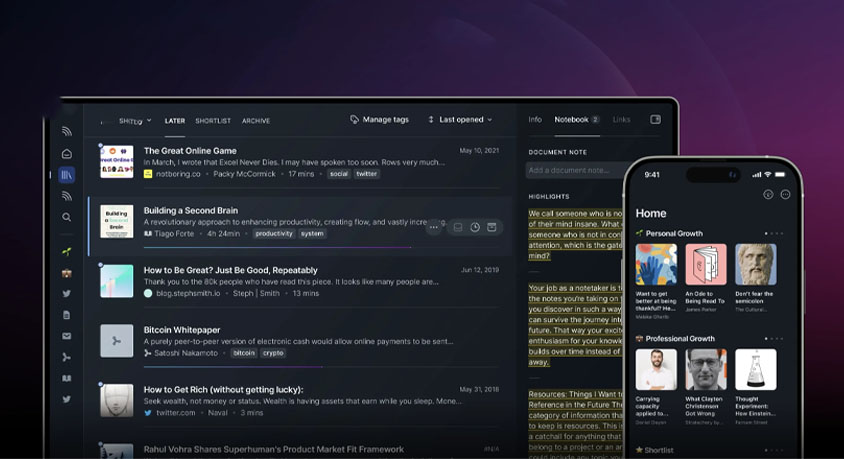
Implement the highlight workflow. As you read on your phone, tablet, or computer, select any sentence that resonates. Highlight it. Readwise syncs every highlight across all your devices automatically. Here is the critical step: connect Readwise to Notion, Obsidian, or Logseq in the settings. Now every highlight you make flows directly into your permanent knowledge base. You never lose a good quote again. Enable the Daily Review feature. Each morning, Readwise sends you five random highlights from your past reading. This spaced repetition ensures the ideas stick. You literally get smarter while sleeping.
Use triage to filter noise. Reader presents your incoming content as a feed. Swipe through it like TikTok but for reading. Skim the AI summary of each piece. If it lacks value, hit Archive immediately. No guilt. No unfinished lists. The AI already did the filtering work. Only the high-signal content remains.
Leverage text-to-speech for multitasking. Open any article and tap the audio icon. Readwise generates a natural voice narration with multiple accent options. While driving or exercising, your reading list becomes a personal podcast. You consume content during time that used to be dead zones.
Customize your Ghostreader prompts for advanced use. Go to the Ghostreader settings and write specific instructions. Example: "For any article about AI tools, automatically extract the pricing and core features and format them as a table." Every future article meeting that criteria will be processed according to your rule. The system learns your priorities.
A few operational notes. The text-to-speech works offline after download. Queue up articles before flights. Ghostreader queries require an internet connection. Also, Reader respects privacy. Your reading data stays within the system and is not used to train public models. The entire setup takes thirty minutes. After that, your information intake is automated, summarized, and retained. You finally read what you saved.