You check your bank balance. You check your credit card. You check your investment app. You still have no idea where your money actually goes. Copilot Money solves this by connecting every account into one dashboard and applying AI to track, categorize, and forecast your finances. It shows your true net worth in real time and flags problems before they happen. Here is the exact workflow to take control of your money without becoming an accountant.
Start with the secure sync. Open Copilot and navigate to the accounts section. It uses Plaid, the industry-standard protocol that powers most major finance apps. Add your checking accounts, savings, credit cards, and investment accounts—Chase, Amex, Bank of America, Robinhood, even your 401(k). Each connection takes seconds. When finished, you see a complete asset map. No more switching between five apps to understand your position. One graph shows your net worth curve updating in real time. This is your financial baseline.
Now let the AI learn your spending. Copilot scans your last 90 days of transactions automatically. It builds categories based on patterns. Rent goes to Housing. Groceries go to Food. Utilities go to Bills. Review the initial categorization. If the AI mislabels a Target run as Groceries when you actually bought clothes, manually correct it once. The system remembers and asks: "Should all future Target transactions use this category?" Click yes. The AI now applies your logic automatically. Every morning, Copilot pushes a notification: "I have 3 new transactions to review." Open it, confirm or adjust, and close the app. Thirty seconds per day keeps the data accurate.
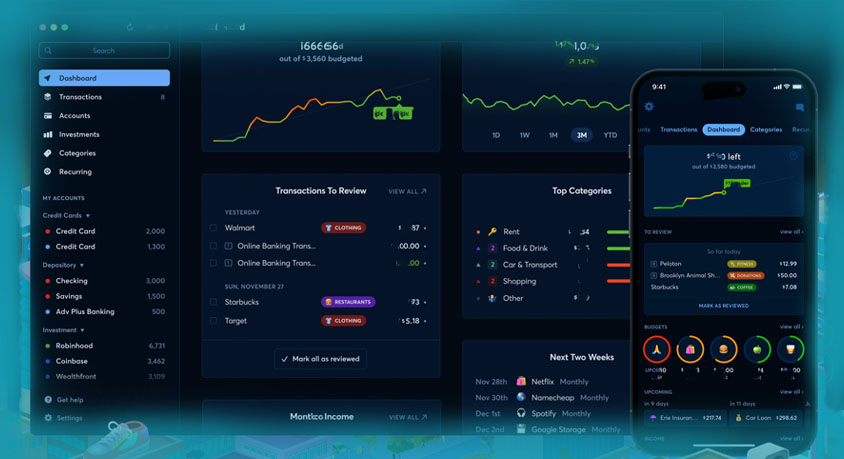
Next, audit your subscriptions. Open the Recurring tab. Copilot lists every regular payment hitting your accounts. Netflix, Spotify, gym memberships, forgotten software trials—all in one place. The average American leaks over $200 per month on subscriptions they no longer use. Scan the list. Highlight anything you do not recognize or no longer need. Click the unsubscribe button integrated into the interface. The app handles the cancellation process. It also monitors for price changes. If Netflix raises its rate, Copilot alerts you immediately.
Use forecasting to prevent surprises. Copilot analyzes your historical spending and projects future expenses. It estimates next month's utility bill based on last year's usage. It predicts your restaurant spending based on recent trends. The dashboard shows a progress bar for each budget category. If your Dining Out bar turns from green to orange, you are approaching your limit. You see this before you swipe the card, not after. The psychological effect changes behavior.
Run intelligent searches when you need answers. Stop scrolling through old statements. Type into the search bar: "How much did I spend on Uber last year?" Copilot returns the total plus a comparison chart. Ask: "What was my average electric bill for winter?" The answer appears instantly. This turns years of transaction data into actionable insight.
Set investment goals with the AI. Navigate to the Goals section and create a new target. Example: "Build a $10,000 emergency fund." Copilot calculates your current monthly surplus and projects how many months until you reach the goal. It updates dynamically as your spending changes. You see progress in real time.
A few critical notes. Copilot uses bank-level encryption and does not sell your data to third parties. This differs from free budgeting apps that monetize your information. Also, understand the limits. The AI provides analysis and forecasts, not financial advice. For major investment decisions or tax filings, consult a certified professional. The tool makes you informed, not licensed. The entire setup takes one hour. After that, you spend thirty seconds per day and know exactly where you stand.