We’ve all been there: It’s 11 PM, you have a presentation tomorrow, and you’re staring at a blank PowerPoint slide, fighting with text boxes that won't align.
The era of "death by PowerPoint" is officially over. Enter Gamma.app, the AI-powered design partner that turns a single sentence into a boardroom-ready presentation. Whether you’re a founder pitching for VC funding or a student aiming for an A+, here is how you use Gamma to do a week’s worth of work in under 30 seconds.
Step 1: The "Genesis" Moment – Choose Your Weapon. Once you sign up at Gamma.app, you’ll be greeted by your new best friend: the AI generator.
1. Click on "Create new with AI."
2. You’ll see three options: Presentation, Document, or Webpage.
3. For this tutorial, select Presentation.
Pro Tip: Gamma doesn't just make "slides"; it creates "cards" that are fluid and responsive. They look just as good on an iPhone as they do on a 100-inch projector.
Step 2: Feed the Beast (The Prompt). This is where the magic happens. Gamma will ask you: "What do you want to create today?"
Don't just say: "A deck about a coffee shop."
Say this instead: "A high-stakes Series A pitch deck for 'BrewBot,' an automated AI-powered specialty coffee kiosk targeting busy tech hubs in San Francisco."
The "Outline" Feature: Within 2 seconds, Gamma will spit out a suggested outline (Problem, Solution, Market Size, etc.). You can drag these around, add new points, or hit "Try again" if it missed the mark.

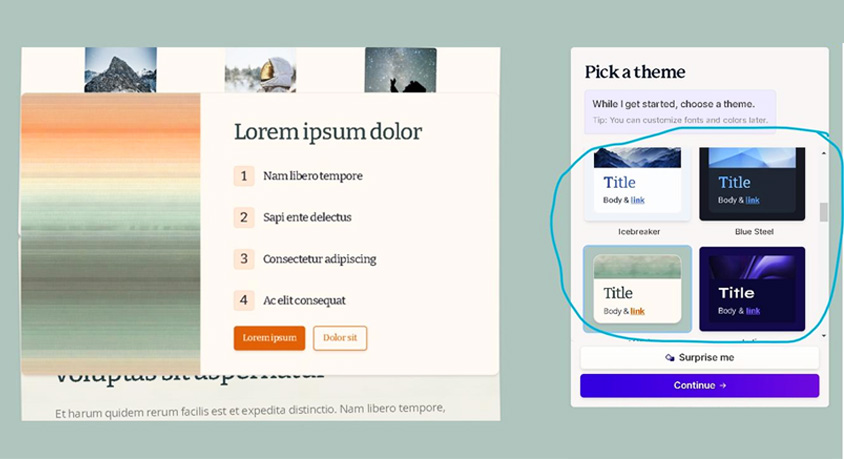
Step 3: Pick Your Aesthetic (The "Million Dollar" Look). On the right-hand side, a theme picker will appear.
For Corporate: Go with "Orbit" or "Prism" for a clean, Google-esque vibe.
For Creative: Try "Neon" or "Atmosphere" to stand out.
Don’t overthink it—you can change the entire theme with one click after the deck is generated. Click "Generate," and watch the AI start building your slides in real-time. It’s like watching a ghost designer work at 100x speed.
Step 4: The Finishing Touches (AI Editing). Gamma isn't just a "one-and-done" tool. It has an AI Sidekick (look for the chat icon on the right).
Want a slide to be more visual? Tell the AI: "Turn this list into a 3-column layout with icons."
Need a better image? Click the image, and use the integrated Unsplash or AI Image Generator to swap it out instantly.
Too much text? Highlight it and tell the AI: "Rewrite this to be more punchy and professional."
Step 5: Present or Export. Once you’re done (which should have taken about... 2 minutes), you have two options:
1. Present mode: Use Gamma’s built-in presentation tool (it has smooth transitions that make PowerPoint look like a flipbook).
2. Export: Download it as a PDF or a PowerPoint (.pptx) file if you need to go old-school.
Why this changes everything:
No more "Alignment Hell": The AI handles all the margins, fonts, and spacing.
Built-in Analytics: If you share the Gamma link, you can actually see who viewed your deck and which slides they spent the most time on.
Web-Ready: You can embed YouTube videos, live Tweets, or even interactive charts directly into the slides.